Quick answer: Keyword cannibalization happens when two or more pages on your site target the same search intent, so Google rotates between them and neither ranks well. Fix it by merging similar pages with a 301 redirect, giving each page a distinct intent, updating titles and using canonical tags.
Keyword cannibalization is a common reason why a good page refuses to rank. When several pages on one site compete for the same query, Google has to choose one, and its choice can change from week to week. Rankings bounce, clicks split and none of the pages builds strong authority. This guide shows how to detect cannibalizing pages and fix them without losing traffic.
What is keyword cannibalization?
Keyword cannibalization means your own pages compete against each other in search results. It usually happens when you publish several articles on very similar topics, such as “how to fix indexing issues”, “indexing problems guide” and “why pages are not indexed”. The topics overlap so much that Google cannot tell which page best serves the query.
Is it always a problem?
No. If two pages from your site rank at positions 1 and 2 for the same query, you may be happy. It becomes a problem when:
- The ranking URL changes often.
- Neither page ranks above position 10.
- The wrong page, such as a thin blog post, outranks your main service page.
- Clicks and links are split between the pages.
How to detect cannibalizing pages
- Open Search Console and go to Performance, then Search results.
- Click a query that matters to you.
- Open the Pages tab. If two or more URLs show impressions for that query, you may have cannibalization.
- Click the Dates tab or compare periods to see if the ranking URL changes.
- Search site:servigate.com plus the keyword in Google to see which of your pages match.
- Export the query and page data to a spreadsheet and group by query to spot overlaps.
How to fix keyword cannibalization
1. Merge pages with the same intent. Combine them into one stronger page, keep the best content from each and redirect the old URLs with a 301 redirect. Update internal links to point to the new page.
2. Differentiate pages with different intent. If one page is a guide and another is a pricing page, keep both and make the difference clear in titles, headings and content. One page can target “how to” queries and another can target “service” or “pricing” queries.
3. Re-optimize titles and headings. Give each page its own primary keyword and make sure no two pages share the same title and H1.
4. Use canonical tags when needed. If pages must stay live but one should be preferred, use a canonical tag. Read Google’s guide to canonical URLs.
5. Fix internal links. Point anchor text for each keyword to the page you want to rank. Do not link the same anchor to several pages.
Example
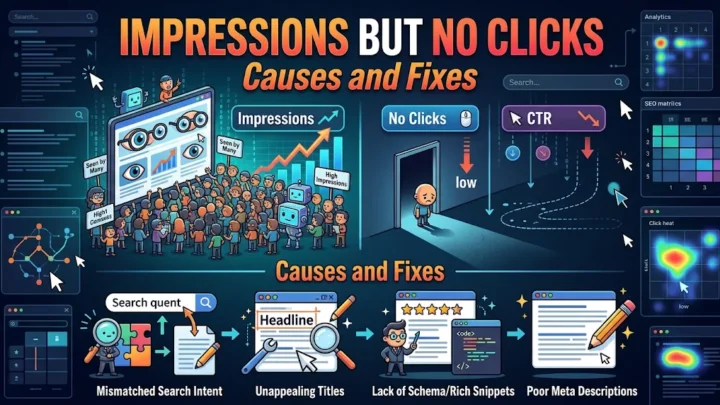
You have two posts: “Impressions but no clicks” and “Why no clicks in Search Console”. Both rank on page 2 for the same query. Merge them into the stronger article, redirect the weaker one and update internal links, such as the ones in our article on impressions but no clicks. After 4 to 6 weeks, check whether a single URL now ranks higher.
Decision table
| Situation | Best fix |
|---|---|
| Two pages, same intent, both weak | Merge and 301 redirect |
| Two pages, different intent | Keep both, differentiate |
| Pages must both stay live | Canonical to the preferred page |
| Wrong page ranks | Strengthen internal links to the right page |
How to prevent cannibalization
- Keep a keyword map: one primary keyword and intent per page.
- Check the map before publishing new content.
- Refresh old posts instead of writing near duplicates.
- Review Search Console every quarter for overlaps.
Once cannibalization is fixed, you may see a page rise from the second page of results. Our guide on moving from page 2 to page 1 explains the next steps.
Cannibalization vs healthy overlap
Not every shared keyword is a problem. A homepage and a blog post may both mention a topic without competing. What matters is intent. If a searcher would be equally satisfied by either page, you have a conflict. If they want different things, such as a tutorial versus a quote, the pages can coexist as long as each is clearly optimized for its own purpose.
Tools to find overlapping pages
- Search Console: filter by query and view the Pages tab.
- A spreadsheet: export query and page data and sort by query to see which URLs repeat.
- A site search: type site:servigate.com with your keyword to see which pages Google associates with it.
- Your CMS: list titles and slugs to spot near duplicates.
Mistakes to avoid when fixing it
- Deleting pages without redirects, which wastes links and traffic.
- Redirecting unrelated pages to the homepage.
- Leaving internal links pointing to the old URL.
- Merging pages but keeping only thin content from the winner.
- Expecting results in days. Allow four to six weeks for Google to reprocess the change.
Frequently asked questions
Is keyword cannibalization always bad?
No. If two pages rank at positions 1 and 2 for the same query, it can be fine. It becomes a problem when pages swap positions or both rank poorly.
How do I find cannibalization in Search Console?
Filter Performance by a query, open the Pages tab and check whether multiple URLs receive impressions for it.
Should I always merge cannibalizing pages?
Merge them when intent is identical. If intent differs, such as guide versus pricing, keep both and optimize each for its own keyword.
Conclusion
Keyword cannibalization weakens your best pages by splitting signals. Detect it in Search Console, decide whether to merge, differentiate or canonicalize, and plan one keyword per page going forward. It is one of the cleanest fixes you can make for rankings.