
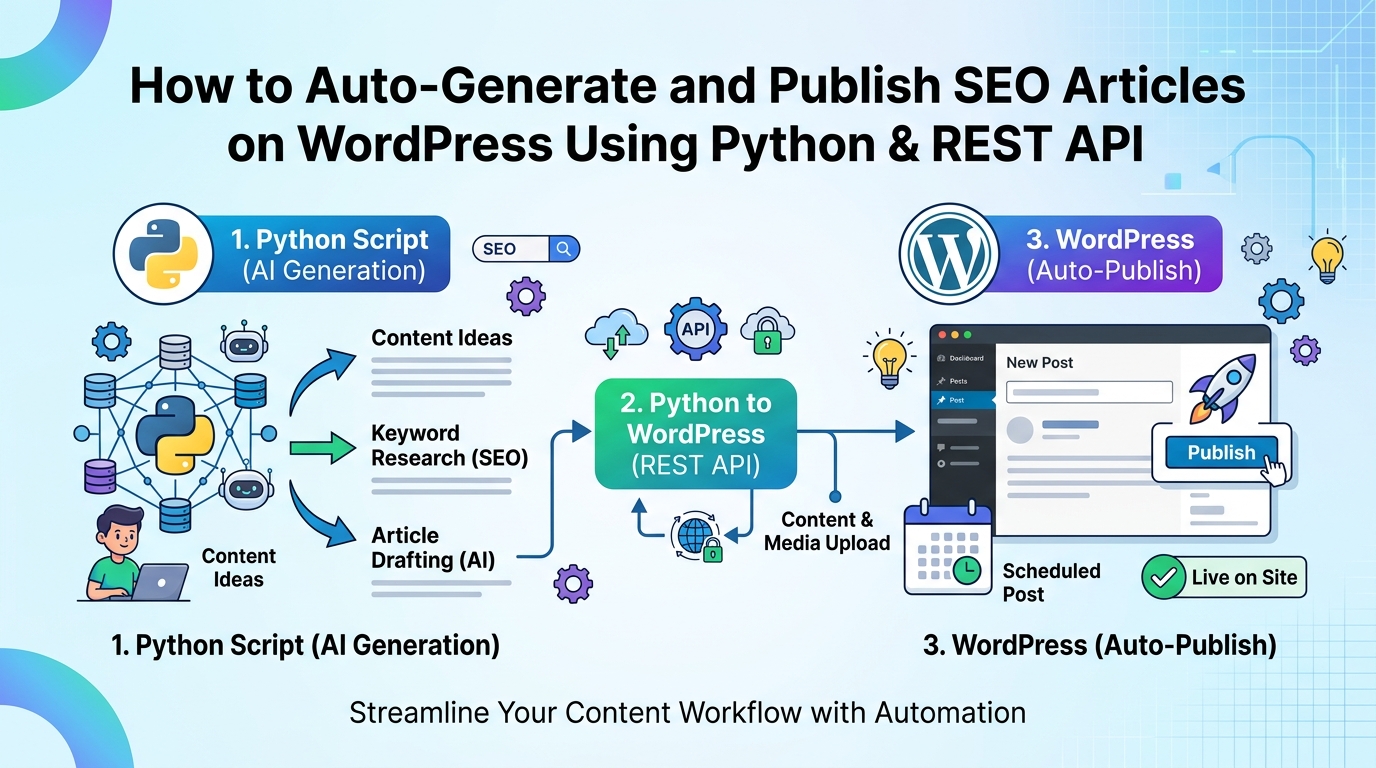
How to Auto-Generate and Publish SEO Articles on WordPress Using Python & REST API
In the relentlessly competitive landscape of digital marketing, content is king – a truth that has only solidified with the advent of sophisticated search algorithms and AI-powered search engines. However, the sheer demand for high-quality, SEO-optimized articles can quickly overwhelm even the most dedicated content teams. Manual content creation is resource-intensive, time-consuming, and often struggles to keep pace with the velocity required to dominate diverse niche markets. What if there was a way to dramatically scale your content production without compromising on SEO efficacy or draining your budget?
Enter the strategic convergence of Python, AI-driven article generation, and the WordPress REST API. This powerful combination unlocks an unprecedented level of automation, allowing businesses and marketers to auto-generate and publish SEO articles on WordPress with remarkable efficiency. This comprehensive guide will meticulously walk you through the technical foundations, practical implementation, and best practices for leveraging Python and the WordPress REST API to revolutionize your content strategy, ensuring your articles not only get published but also rank at the pinnacle of search engine results pages.
The Imperative for Content Automation in Modern SEO
The call for automation isn’t merely about convenience; it’s a strategic necessity. For businesses aiming for significant digital footprint expansion, manually crafting every piece of content from scratch is an unsustainable model. Integrating programmatic approaches to content creation and deployment offers several undeniable advantages:
- Scalability and Efficiency: Produce hundreds or thousands of unique, targeted articles in a fraction of the time it would take human writers. This is crucial for long-tail keyword strategies and covering extensive topic clusters.
- Competitive Advantage: Rapidly respond to market trends, keyword shifts, and competitor strategies by deploying fresh, relevant content at an unparalleled pace.
- Resource Optimization: Reallocate your valuable human talent from repetitive content generation tasks to higher-value activities like content strategy, in-depth editing, and creative ideation.
- Consistency and Timeliness: Maintain a consistent publishing schedule, ensuring your website remains fresh and authoritative in the eyes of search engines and users alike.
- Cost Reduction: Significantly lower the per-article cost of content production, leading to a much higher ROI on your content marketing efforts.
Understanding the Core Technologies Driving This Revolution
To successfully auto-generate and publish SEO articles, a foundational understanding of the key technological components is essential.
Python: The Powerhouse for Automation and Data Handling
Python has emerged as the de facto language for automation, data science, and artificial intelligence, making it an ideal choice for this undertaking. Its robust ecosystem of libraries provides unparalleled capabilities:
- Web Scraping & Data Sourcing: Libraries like Beautiful Soup and Scrapy enable the collection of data that can inform or populate your articles.
- Text Processing & NLP: NLTK, spaCy, and other natural language processing libraries can analyze, summarize, and refine generated text.
- API Interactions: The
requestslibrary simplifies interactions with external APIs, including AI content generation services and the WordPress REST API. - AI/ML Integration: Python is the primary language for interacting with cutting-edge AI models, allowing seamless integration of natural language generation (NLG) into your workflow.
WordPress REST API: Your Publishing Gateway
The WordPress REST API is a powerful interface that allows external applications to interact with your WordPress site. It essentially turns your WordPress installation into a programmable platform, enabling you to:
- Create, Read, Update, and Delete (CRUD) Content: Manage posts, pages, categories, tags, users, and media programmatically.
- Fetch Data: Retrieve existing content, settings, and user information.
- Automate Publishing: The core functionality for our purpose, allowing Python scripts to push generated articles directly to your site.
Understanding the API endpoints, HTTP methods (GET, POST, PUT, DELETE), and authentication mechanisms (like application passwords) is critical for secure and effective integration.
AI/NLG Models: The Content Engine
At the heart of article generation are advanced Natural Language Generation (NLG) models, often powered by large language models (LLMs) like OpenAI’s GPT series, Google’s Gemini, or open-source alternatives. These models can:
- Generate Coherent Text: Produce human-like text based on prompts, keywords, and structural guidelines.
- Summarize and Expand: Condense existing information or elaborate on brief inputs.
- Adapt Tone and Style: Generate content that aligns with a specific brand voice or target audience.
The quality of generated content heavily relies on effective “prompt engineering”—crafting precise instructions and examples for the AI model to follow. This is where your SEO expertise becomes invaluable, guiding the AI to produce content that is not just readable but also semantically rich and optimized for search engines.
Setting Up Your Environment: A Practical Foundation
Before diving into script development, a proper setup ensures a smooth and secure workflow.
Prerequisites: What You’ll Need
- A WordPress Website: Ensure it’s self-hosted or a Business/eCommerce plan on WordPress.com, as you’ll need full API access.
- Python 3.x Installed: Download from python.org.
- Internet Connection: To interact with AI APIs and your WordPress site.
- Basic Understanding of Python: Familiarity with variables, functions, and libraries will be beneficial.
WordPress Configuration for API Access
The WordPress REST API is enabled by default on modern WordPress installations. However, for programmatic publishing, you’ll need a secure way for your Python script to authenticate.
The most secure and recommended method for external applications is using Application Passwords:
- Log in to your WordPress admin dashboard.
- Navigate to Users > Profile (or Users > All Users and then edit the user you want to generate the password for).
- Scroll down to the “Application Passwords” section.
- Enter a descriptive name for your new application password (e.g., “Python Content Bot”) and click “Add New Application Password.”
- WordPress will generate a unique 24-character password. Copy this password immediately, as it will not be displayed again. This password grants the application the same permissions as the user it’s associated with, so choose a user with appropriate publishing rights.
Security Note: Treat this application password like a highly sensitive credential. Never hardcode it directly into your scripts. Use environment variables or a `.env` file for secure storage.
Python Environment Setup
It’s best practice to use a virtual environment for your Python projects to manage dependencies cleanly.
- Create a Virtual Environment:
python3 -m venv content_automation_env - Activate the Virtual Environment:
- On macOS/Linux:
source content_automation_env/bin/activate - On Windows:
.\content_automation_env\Scripts\activate
- On macOS/Linux:
- Install Required Libraries:
pip install requests python-dotenv openai markdownrequests: For making HTTP requests to APIs.python-dotenv: For securely loading environment variables (like API keys and application passwords).openai: If using OpenAI’s API for content generation (install specific library for other AI models if needed).markdown: (Optional) To convert Markdown formatted AI output into HTML.
- Create a
.envfile: In your project root, create a file named `.env` and add your sensitive credentials:WORDPRESS_URL=https://yourdomain.com WORDPRESS_USERNAME=your_wordpress_username WORDPRESS_APP_PASSWORD=your_24_char_app_password OPENAI_API_KEY=your_openai_api_keyRemember to add `.env` to your `.gitignore` file if you’re using version control.
The Automation Workflow: From Idea to Publication
This section details the methodical process of taking an article idea, generating content with AI, and publishing it to WordPress using Python and the REST API.
Step 1: Content Generation Strategy & Data Sourcing
Effective automation begins with a clear strategy. You need to define:
- Keyword Research & Topic Clusters: Identify high-volume, low-competition keywords or specific long-tail queries that your automated content will target. Group related keywords into topic clusters for comprehensive coverage.
- Content Templates & Structure: Design a general template for your articles (e.g., H1, H2s, H3s, introduction, body paragraphs, conclusion, call to action). This template will guide the AI generation process.
- Data Inputs for AI:
- Seed Keywords: The primary keywords for the article.
- Outline/Headings: A structured list of H2s and H3s that the AI should follow.
- Contextual Information: Any specific facts, statistics, or unique selling propositions you want the AI to incorporate. This can come from internal databases, scraped data, or pre-researched snippets.
- Target Audience: Instructions on tone, style, and complexity.
Step 2: Leveraging AI for Article Generation
This is where the magic happens. Your Python script will interact with an AI API to generate the article content.
Interacting with AI APIs (Example with OpenAI)
Using the `openai` Python library, you can send prompts to the model and receive generated text. The quality of your prompt is paramount.
Key aspects of prompt engineering for SEO articles:
- Clarity and Specificity: Clearly state the topic, desired length, tone, and format.
- Keyword Integration: Instruct the AI to naturally embed primary and secondary keywords.
- Structural Guidance: Provide a detailed outline (H2s, H3s) and ask the AI to fill in the content under each.
- SEO Elements: Ask for a compelling meta title and description, and even suggestions for internal links or related topics.
- Persona/Role Playing: Instruct the AI to act as a “senior SEO specialist” or “expert content writer.”
Example Python snippet (conceptual):
import openai
import os
from dotenv import load_dotenv

load_dotenv()
openai.api_key = os.getenv("OPENAI_API_KEY")

def generate_seo_article(topic, outline, keywords):
    prompt = f"""
    You are an expert SEO content writer. Your task is to write a comprehensive, engaging, and highly optimized blog post on the topic: "{topic}".

    Structure the article using the following outline:
    {outline}

    Naturally incorporate the following keywords throughout the article, especially in headings and the introduction: {', '.join(keywords)}.

    The article should be professional, authoritative, and conversational. Aim for a detailed explanation under each heading.
    Also, provide a compelling meta title (under 60 characters) and a meta description (under 160 characters) at the beginning.
    """

    response = openai.chat.completions.create(
        model="gpt-4", # Or gpt-3.5-turbo, or your preferred model
        messages=[
            {"role": "system", "content": "You are a helpful SEO content generation assistant."},
            {"role": "user", "content": prompt}
        ],
        max_tokens=2000, # Adjust based on desired article length
        temperature=0.7 # Adjust for creativity vs. coherence
    )
    return response.choices[0].message.content

# Example usage
article_topic = "How to Auto-Generate and Publish SEO Articles on WordPress Using Python & REST API"
article_outline = """
- Introduction: The Content Automation Revolution
- The Imperative for Content Automation in Modern SEO
- Understanding the Core Technologies Driving This Revolution
    - Python: The Powerhouse for Automation and Data Handling
    - WordPress REST API: Your Publishing Gateway
    - AI/NLG Models: The Content Engine
- Setting Up Your Environment: A Practical Foundation
    - Prerequisites: What You'll Need
    - WordPress Configuration for API Access
    - Python Environment Setup
- The Automation Workflow: From Idea to Publication
    - Step 1: Content Generation Strategy & Data Sourcing
    - Step 2: Leveraging AI for Article Generation
    - Step 3: Preparing Content for WordPress
    - Step 4: Publishing via WordPress REST API with Python
- Advanced Considerations & Best Practices
    - Content Quality and Uniqueness
    - Technical SEO Integration
    - Scalability and Monitoring
    - Ethical Implications and Transparency
- Potential Challenges and Solutions
- The Future of SEO: AI-Powered Content and Beyond
- Conclusion & Key Takeaways
"""
seo_keywords = ["auto-generate SEO articles", "publish articles WordPress Python", "WordPress REST API automation", "Python AI content"]

generated_content_raw = generate_seo_article(article_topic, article_outline, seo_keywords)
# You would then parse generated_content_raw to extract title, description, and main body
Content Refinement and Quality Control
While AI is powerful, raw AI output may sometimes require refinement. Consider implementing:
- Automated Grammar & Spell Checks: Tools like LanguageTool or spaCy can catch errors.
- Readability Scores: Use libraries to check Flesch-Kincaid or other readability metrics.
- Plagiarism Checks: Integrate with plagiarism detection APIs if necessary.
- Human Review (Initially): For critical content or during the setup phase, a human touch remains invaluable to ensure brand voice, accuracy, and nuanced quality.
Step 3: Preparing Content for WordPress
WordPress expects content, especially the post body, to be in HTML format. If your AI generates plain text or Markdown, you’ll need to convert it.
- Markdown to HTML: If your AI outputs Markdown, the `markdown` Python library is excellent for conversion.
import markdown # Assuming 'generated_article_body_markdown' is the Markdown content html_content = markdown.markdown(generated_article_body_markdown) - Structuring the Payload: Beyond the main content, you’ll need to prepare other metadata that WordPress requires for a post:
title: The post title.slug: The URL-friendly version of the title.content: The HTML body of the article.status: ‘publish’, ‘pending’, or ‘draft’.categories: An array of category IDs.tags: An array of tag IDs.featured_media: The ID of an uploaded image (requires separate media upload via API).meta: For custom fields, including SEO plugin data (e.g., Yoast SEO meta description, focus keyword).
You may need to make separate API calls to retrieve category and tag IDs, or create them if they don’t exist.
Step 4: Publishing via WordPress REST API with Python
This is the final step where your script communicates with your WordPress site to create the new post.
Authentication with Application Passwords
The `requests` library supports basic authentication, which is how Application Passwords work with the WordPress REST API.
Basic Structure of the POST Request:
import requests
import os
from dotenv import load_dotenv
import json # For formatting the payload
load_dotenv()
WORDPRESS_URL = os.getenv("WORDPRESS_URL")
WORDPRESS_USERNAME = os.getenv("WORDPRESS_USERNAME")
WORDPRESS_APP_PASSWORD = os.getenv("WORDPRESS_APP_PASSWORD")
def publish_article_to_wordpress(title, content_html, categories, tags, status='publish'):
api_url = f"{WORDPRESS_URL}/wp-json/wp/v2/posts"
headers = {
"Content-Type": "application/json"
}
# Use basic authentication with username and application password
auth = (WORDPRESS_USERNAME, WORDPRESS_APP_PASSWORD)
payload = {
"title": title,
"content": content_html,
"status": status,
"categories": categories, # Expects an array of integer IDs
"tags": tags, # Expects an array of integer IDs
# "featured_media": media_id, # If you've uploaded a featured image
# "slug": "my-seo-article-slug", # Optional, WordPress auto-generates if not provided
# "comment_status": "closed" # Example of other post settings
}
try:
response = requests.post(api_url, headers=headers, auth=auth, data=json.dumps(payload))
response.raise_for_status() # Raise HTTPError for bad responses (4xx or 5xx)
print(f"Article '{title}' published successfully!")
print(f"Permalink: {response.json().get('link')}")
return response.json()
except requests.exceptions.HTTPError as err:
print(f"HTTP error occurred: {err}")
print(f"Response content: {response.json()}")
except Exception as err:
print(f"An error occurred: {err}")
return None
# --- Example Usage (assuming you have your content and category/tag IDs) ---
# You'd typically get these dynamically or from a configuration
article_title = "Leveraging AI for Scalable Content Marketing"
article_content = "Introduction
This is the engaging introduction...
Why AI is Crucial
AI helps scale...
"
category_ids = [1, 5] # Example category IDs (e.g., 'SEO', 'Automation')
tag_ids = [10, 12] # Example tag IDs (e.g., 'AI', 'Content Marketing')
# published_post_data = publish_article_to_wordpress(article_title, article_content, category_ids, tag_ids)
Remember that before assigning categories and tags, you might need to query the `/wp/v2/categories` and `/wp/v2/tags` endpoints to get their respective IDs, or even create new ones if they don’t exist.
Advanced Considerations & Best Practices
Automating content creation is not a set-it-and-forget-it operation. To truly excel, you must integrate advanced strategies and maintain rigorous quality control.
Content Quality and Uniqueness
- Human-in-the-Loop Review: For high-value content or during initial stages, incorporate a human review step. This ensures accuracy, adherence to brand voice, and provides a final layer of quality assurance.
- Fact-Checking: If your content involves factual claims, consider integrating an automated fact-checking mechanism or assigning a human editor for verification.
- Maintaining Brand Voice and Tone: Train your AI models with examples of your existing high-quality content to help it learn and replicate your brand’s unique voice.
- Avoid Content Duplication: Ensure generated content is unique, either by careful prompt engineering or by employing originality checkers.
Technical SEO Integration
Beyond the article text, automate other crucial technical SEO elements:
- Internal Linking: Develop a system in Python to identify relevant existing articles on your site and insert internal links automatically, improving site architecture and crawlability.
- Schema Markup Generation: Based on the article type (e.g., Article, HowTo, FAQ), dynamically generate and insert appropriate JSON-LD schema markup into the article content or post meta.
- Image Optimization & Alt Text: If your articles include images, automate their upload via the media API, generate descriptive `alt` text using AI, and ensure they are properly sized and compressed.
- Yoast/Rank Math Integration: Many SEO plugins store their data in custom fields or through their own REST API endpoints. Explore these to programmatically set meta descriptions, focus keywords, and other plugin-specific SEO settings.
Scalability and Monitoring
- Batch Processing: For large-scale content generation, implement batch processing to generate and publish multiple articles efficiently, respecting API rate limits.
- Error Logging and Alerting: Implement robust error handling and logging. Set up alerts (e.g., via email, Slack) for publishing failures, API errors, or AI generation issues.
- Performance Monitoring: Track the performance of your automated articles using SEO tools (Google Analytics, Search Console, Ahrefs, SEMrush) to identify what’s working and what needs refinement in your automation strategy.
Ethical Implications and Transparency
- Disclosing AI Usage: Depending on your industry and audience, consider transparently disclosing when content has been AI-assisted or AI-generated. Trust and transparency build long-term relationships.
- Avoiding Content Spam: The goal is quality at scale, not just quantity. Avoid generating low-quality, keyword-stuffed content that provides no value to users, as this can lead to penalties from search engines.
- Focusing on User Value: Always prioritize the user experience. AI-generated content should aim to be informative, engaging, and helpful, just like human-written content.
Potential Challenges and Solutions
While powerful, this automation isn’t without its hurdles.
- API Rate Limits: Both AI APIs and WordPress APIs often have rate limits.
- Solution: Implement exponential backoff for retries and introduce delays (`time.sleep()`) between API calls.
- Content Quality Inconsistencies: AI can occasionally produce repetitive, generic, or factually incorrect content.
- Solution: Refine prompts, provide more contextual data, implement post-generation quality checks (human or automated), and use more advanced AI models.
- Maintaining SEO Best Practices: Ensuring AI consistently generates SEO-friendly content (keyword density, LSI, structure) can be tricky.
- Solution: Embed SEO guidelines directly into your prompts, and use Python to perform post-generation SEO audits (e.g., checking keyword usage, heading hierarchy).
- Security Concerns: Exposing API keys or application passwords.
- Solution: Always use environment variables (`python-dotenv`), never hardcode credentials, and restrict the permissions of the WordPress user associated with the application password.
The Future of SEO: AI-Powered Content and Beyond
The landscape of search is constantly evolving. With the rise of Generative AI in search engines (like Google’s Search Generative Experience and Perplexity AI), content that provides clear, direct answers, strong factual grounding, and semantic depth will be favored. Automated content generation, when done strategically, is perfectly positioned to meet these demands.
The role of the human SEO specialist and content marketer will shift from manual creation to strategic oversight, prompt engineering, quality assurance, and nuanced refinement. It’s about augmenting human creativity and expertise with AI’s unparalleled speed and scale.
This automation paradigm allows for continuous learning and adaptation. By monitoring the performance of your AI-generated articles, you can iteratively refine your prompts, data inputs, and publishing logic, making your content automation process increasingly intelligent and effective over time.
Conclusion
Automating the generation and publication of SEO articles on WordPress using Python and the REST API is no longer a futuristic concept; it’s a present-day reality offering immense strategic advantages. By meticulously crafting your content strategy, leveraging the power of Python for automation, harnessing advanced AI models for generation, and interfacing seamlessly with the WordPress REST API, you can achieve content scalability previously thought impossible.
This approach frees up invaluable human resources, accelerates your content velocity, and positions your brand to dominate search engine results. While technical expertise is required, the long-term benefits in terms of efficiency, cost-effectiveness, and competitive edge are profound. Embrace this evolution, and transform your content marketing into a hyper-efficient, SEO-driven powerhouse.
Key Takeaways
- Content Automation is Crucial: It enables scalability, efficiency, and a significant competitive advantage in modern SEO.
- Python is the Automation Hub: Leverage its libraries for data handling, AI interaction, and API communication.
- WordPress REST API is the Publishing Bridge: It allows programmatic creation, updating, and management of WordPress content.
- AI/NLG Models Drive Generation: Effective prompt engineering is key to producing high-quality, SEO-optimized text.
- Secure Setup is Paramount: Use virtual environments and `python-dotenv` for managing dependencies and sensitive credentials like WordPress Application Passwords.
- The Workflow Involves: Strategy, AI generation, content preparation (e.g., Markdown to HTML), and secure API publishing.
- Advanced SEO & Quality Control are Vital: Integrate internal linking, schema markup, and a human review loop to maintain excellence.
- Anticipate and Address Challenges: Plan for API rate limits, quality inconsistencies, and security from the outset.
- Focus on User Value: Automated content should still aim to be informative, engaging, and provide genuine value to readers and search engines.
The piece frames automation as a strategic necessity but glosses over the failure mode that matters most: publishing at scale without a dedupe step means you can flood your own site with near-identical articles and tank crawl trust. Before wiring the REST API call, hash each generated body and compare against existing post content via the posts endpoint; skip or rewrite anything above a similarity threshold you set. That one check prevents most of the self-inflicted damage this workflow can cause.